IRL Chat Bot Alerts: Tell Chat You Dropped Before They Ask
Post live, BRB, and back alerts to Twitch, Kick, and YouTube chat server-side, with no PC and no cloud OBS, plus commands like !bitrate.
By VISP Team ·
Every IRL streamer knows the ninety seconds. Your phone loses signal in an underpass, the stream freezes, and chat starts typing. "Is he dead?" "Buffering for me too." "F." By the time you are back, somebody has already asked whether the stream ended, three people have answered wrong, and a mod is apologising on your behalf.
The frustrating part is that something knew. Your phone knew it lost the uplink. The relay knew the packets stopped. The only participant who did not know was chat, the one group that was actively asking.
This post is about closing that gap with a chat bot that reads stream state from the signal path instead of guessing at it.
Why ordinary chat bots cannot tell you dropped
Nightbot, StreamElements, Fossabot and friends are excellent at what they do, and what they do is live inside the platform. That is precisely why they are the wrong tool for this one job.
They see the platform's idea of "offline", not yours. Twitch does not mark a channel offline the moment your phone loses signal. It waits. With a cloud OBS or a relay in the path it may never mark you offline at all, because something is still sending it video — a BRB card, a held encoder, a frozen frame. From the platform's point of view you are live the whole time. From chat's point of view you have been frozen for a minute.
They cannot see the difference between a blip and an ending. A bot watching the platform API only has one bit: live or not live. The distinction an IRL audience actually cares about — "he is walking through a dead zone, wait" versus "the stream is over, goodnight" — is not in that bit.
Cloud OBS services solve this differently, by putting a computer in the path that a moderator can drive. That works, and IRLToolkit charges $129 a month for it. If you want the full comparison of what that buys, we wrote one: IRLToolkit alternatives. But paying for a cloud computer so that chat gets told about a dropout is a large solution to a small problem.
What the relay already knows
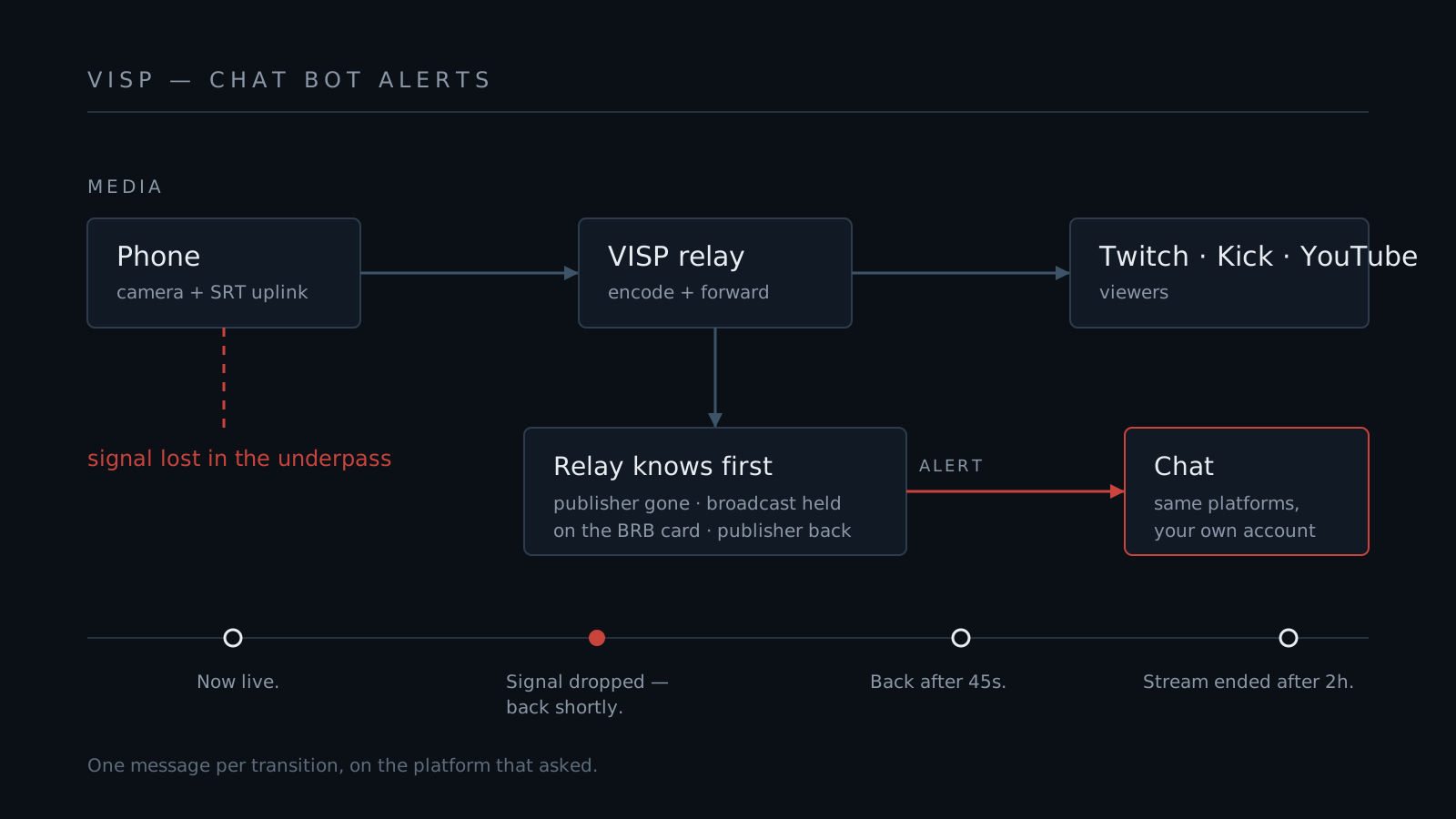
VISP sits between your phone and the platform. It is the piece that finds out first, and it finds out in detail:
- The publisher connected. A device started sending, which is the real moment you went live — before the platform's own indicator catches up.
- The source is gone. MediaMTX reports the publisher disappearing within seconds, and a reconciliation pass catches anything the hook misses.
- Whether the broadcast is being held. If you have Never drop again enabled, VISP keeps the outgoing stream alive on a BRB card rather than tearing the platform output down. The relay knows which of the two happened.
- The publisher came back. And how long the gap was, to the second.
That last pair is the whole point. "Signal dropped, holding the stream" and "the stream ended" are genuinely different events, and VISP is in the one position where the difference is unambiguous. So the chat bot sends different messages for them:
| What happened | What chat sees |
|---|---|
| A device started publishing | Now live. |
| Source lost, broadcast held on the BRB card | Signal dropped — the stream is held on the BRB card, back shortly. |
| Source returned | Back — the signal recovered after 45s. |
| Source lost, outputs torn down | Stream ended after 2h 5min. Thanks for watching! |
Every line is editable, and each one has an on/off switch, because plenty of streamers want the drop alert and nothing else.
No PC in the path
The bot runs server-side. The relay sees your source appear or vanish and reports it; VISP's app host posts the message. Not on your phone, not on a computer at home, not in a browser tab you have to remember to leave open.
That matters more than it sounds. A bot running on your phone dies with the app that stopped when you took a call. A bot running on your home PC needs the PC on. A bot that needs a dashboard tab open needs you to have left one open. The alert about your stream dropping is the single alert most likely to be delivered by something that just went down with it — so it should not run anywhere near the thing that broke.
Since the alerts fire from stream state, they also fire when you are nowhere near a screen. Phone in the pocket, arm out for the gimbal, walking. Chat still finds out.
Setting it up
The bot is optional and off by default.
- Open the Chat tab on the VISP dashboard and find Chat bot.
- Turn on Let VISP post in my chat.
- Pick which of Twitch, Kick, and YouTube to post on. Anything not authorized yet shows an Authorize posting button that reopens the platform's own consent screen.
- Hit Send test. A real message lands in real chat, which is the only proof that matters.
The permissions are the narrow ones. Twitch needs channel:bot when the VISP
bot posts, or user:write:chat when your own account does. Kick needs
chat:write, and YouTube uses youtube.force-ssl — the scope you already
granted if you use Direct or edit your title from VISP. VISP re-requests
everything you had already granted at the same time, so authorizing the bot
never quietly switches off chat reading or Direct.
One thing to know before you turn it on: who the messages come from. On Twitch, the VISP bot account posts by default, so alerts are clearly separate from you. Eligible accounts can switch Twitch sender to My Twitch account if they want the announcement to carry the broadcaster's name and badge. On Kick and YouTube, messages always post as your own linked account.
Commands, because the bot is already listening
Once the bot is connected to your chat it may as well answer questions. The built-ins are the ones an IRL audience actually asks:
!bitrate— the live figure straight from the link: bitrate, round-trip time, packet loss. When chat says "you look blocky", this settles it.!uptime— how long the current stream has been up.!viewers— counts from each platform you have linked, which is genuinely useful when you are multistreaming and cannot see any of them.!commands— the list.!title <text>— for you and your moderators, updates the title everywhere at once. A mod can retitle the stream when the plan changes without touching a dashboard.
Custom commands are plain text: !discord, !route, !gear, the usual. A
custom command with the same name as a built-in wins, so you can override
!uptime with your own joke if you like.
Replies go back to the platform the question came from. One viewer asking on Kick does not make the answer appear in your Twitch chat too.
The boring parts that keep you unbanned
A chat bot is a machine with permission to type in your name, which is a thing worth being conservative about. The limits are deliberate:
- One line, 200 characters. Long replies get truncated rather than split.
- Twenty messages a minute per platform, and at least a second and a half between any two. A bot in a loop is what gets accounts timed out.
- Viewers wait out a cooldown; you and your mods do not. Ten seconds by default on custom commands, so one person cannot make the bot flood.
- Each alert fires once per transition. The drop hook and the periodic reconciliation both report the same dropout, and the bot claims each event once across every server instance. A link that flaps twice in a minute mentions it once.
- The bot only listens while something is publishing or while the BRB card is up. Offline, it is not connected to your chat at all.
What it does not do
Honesty is cheaper than a support ticket:
- No bot of your own on Kick or YouTube. Alerts there come from your own account; only Twitch has the shared VISP bot.
- No
!location,!speed, or!battery. Those need telemetry the VISP app does not report yet. When it does, they are a small addition. - No timers or periodic messages. Nothing scheduled, only reactive.
- No moderation actions. The bot never times anyone out or deletes anything.
- No bonding. This is a chat feature; if you need multiple cellular modems aggregated, that is still a different conversation.
Where this leaves the $129
If what you need from a cloud OBS service is scenes, overlays, and a moderator who can drive your production while you are outside, pay for one. That is a real product solving a real problem.
If what you needed was for chat to be told when your signal dropped, that should not cost a subscription, and it should not require a computer to be awake at home to say it. It is free during the VISP beta, alongside the BRB card that keeps the broadcast alive while you walk out of the dead zone.
The full reference — every alert, every command, every permission — is in the chat bot documentation.
Bring the field into your OBS studio
Try VISP free during beta. You never have to paste a stream key anywhere.
Try VISP free