How to Keep Your Stream Live When the Mobile Network Drops
Build a resilient IRL stream with SRT recovery, adaptive bitrate, reconnection, a BRB card or OBS fallback scene, bonding, and honest limits on bad networks.
By VISP Team ·
You cannot make a mobile stream literally impossible to drop. You can keep a brief field outage from ending the viewer-facing broadcast by using several layers together: keep the destination output running somewhere other than the phone, send the field feed over SRT, use a conservative adaptive bitrate, tune the recovery window, reconnect automatically, and show a fallback while the phone is gone. With VISP Direct that fallback is the relay's optional BRB card; with your own OBS it is a local fallback scene. Add network bonding when live field video must survive one connection failing.
That distinction prevents a common disappointment. A resilient production is not one perfect protocol setting. It is a system that fails gracefully and recovers without forcing the audience to refresh or find a new broadcast.

First identify which connection is failing
An IRL workflow often contains two separate internet legs:
- the phone or field encoder sends video to the relay or home studio;
- the relay or OBS sends the program to Twitch, Kick, YouTube, or another destination.
VISP separates those legs. The phone publishes to the VISP relay. With Direct, the default, the relay itself holds the platform connection; in the optional OBS workflow, OBS reads the feed and publishes the final production. If the phone loses coverage, the second leg can remain healthy. The relay can keep the platform output open behind a BRB card, and OBS can keep sending local graphics, music, a BRB scene, or another camera.
If OBS itself reports dropped frames to the destination, troubleshoot the home uplink instead. The OBS connection troubleshooting guide explains that dropped network frames normally mean the connection cannot sustain the configured bitrate or is unstable between OBS and the ingest server. A field fallback cannot repair a failing home connection.
Give the bitrate room to breathe
A mobile speed test is a snapshot, not a safe streaming bitrate. Upload capacity changes as the phone moves between cells, enters a building, competes with other users, or heats up. A stream configured near the best observed upload rate has no margin when conditions change.
Start below the repeatable worst-case upload rate on the actual route. A stable 720p feed is more useful than a 1080p feed that continually overruns the connection. Keep the keyframe interval at two seconds so decoders and fallback logic do not wait too long for a clean recovery point.
Enable adaptive bitrate when the publishing application supports it. The VISP app adapts its bitrate automatically from link health, within a floor and ceiling set by the capture format, and uses a two-second keyframe interval. Larix Broadcaster documents modes that lower the target bitrate in response to delivery problems and then cautiously restore quality. Adaptation preserves continuity by sacrificing detail before the encoder's queue becomes unmanageable. It still needs a sensible minimum; video cannot remain intelligible after available bandwidth collapses to zero.
Use SRT for recovery, not miracles
SRT sends media over UDP and can retransmit missing packets. The receiver holds packets inside a latency buffer, giving retransmissions time to arrive before the video is decoded. This is valuable on mobile networks where loss and jitter occur in bursts.
The latency value is a trade. Too little latency means a retransmitted packet may arrive after its playback deadline. Too much adds unnecessary delay and can make remote direction awkward. The VISP phone app uses a fixed two-second SRT latency. For a third-party encoder, the dashboard probe on the Advanced tab uses measured round-trip time and a network profile to recommend a starting point. Run it on the same connection and in conditions similar to the real stream.
For cellular use, VISP applies a larger multiplier and minimum than it does for wired or Wi-Fi networks because cellular jitter is less predictable. Treat the recommendation as a safe starting point, then test motion, audio, and recovery. Do not tune latency downward only to advertise a smaller number.
The OBS SRT guide describes OBS's SRT input behavior. If you use OBS, VISP generates the authenticated read URL and scene collection so creators do not need to construct stream IDs by hand.
Reconnect both ends automatically
SRT can recover packet loss while a connection exists. It cannot transmit during a complete outage. The publisher, and the OBS source if you use one, must therefore recover when the network returns.
The VISP phone app reports a reconnecting state and retries after a loss. The generated OBS media sources use automatic reconnection. Third-party encoders such as Larix or Moblin should be configured to reconnect to the same VISP publishing URL rather than create a new path.
Only one publisher can own a VISP path at a time. Do not run a second encoder against the same device URL as a hot standby; the first connection remains the owner and the later publisher is rejected. Use a separate publishing device if a second camera is genuinely needed.
Keep the output live with a BRB card or fallback scene
The field feed disappearing does not require the destination stream to end.
With Direct, open the dashboard BRB tab and turn on Show a BRB card when my stream drops. It is off by default. When it is on, a lost ingest keeps each Direct output open and shows the card until the phone returns or you end the broadcast. The BRB screen without OBS guide covers the options.
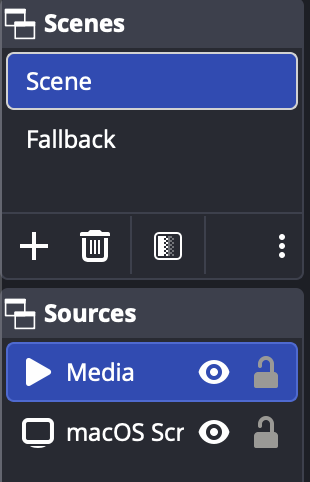
If you produce in OBS, create a local fallback scene containing something the home computer can render without the phone: a branded slate, schedule, music, studio camera, or recap video. Then switch to it when the media source stops playing.
VISP's downloadable OBS scene collection includes a fallback scene. With the Advanced Scene Switcher plugin, use a Media condition for the remote source, not merely a scene-visibility condition. A practical starting configuration is:
- require the media source to be playing for two seconds before returning to the live scene;
- require it to be stopped for three seconds before switching to fallback.
Those delays prevent scene flapping while SRT reconnects or the decoder changes state. Tune them only after observing real failures. A one-frame interruption should not make the program cut back and forth.
Monitor the right signals
The field operator needs information they can act on. Watch encoder bitrate, reconnect attempts, audio level, battery, temperature, and which network is active. The producer should watch the Direct output status or the OBS media state, plus destination health.
Do not use the phone's preview as proof that video left the phone. A camera can be capturing locally while the uplink is stalled. Confirm the relay path is live and the output is advancing. Before a long route, intentionally disable the phone's connection and verify this sequence:
- the field feed freezes or stops;
- the BRB card or OBS fallback scene appears without ending the broadcast;
- the phone reports reconnection attempts;
- the feed returns when connectivity is restored;
- the program returns to live video once playback is stable.
That five-minute failure drill is more valuable than another hour adjusting settings on a perfect home Wi-Fi connection.
Know when you need bonding
SRT, adaptive bitrate, and fallback handle degradation and recovery. They do not keep field video moving through an area where the active connection has no usable route. If continuous field pictures are mandatory, add multiple truly independent connections and a system that combines them at the far end.
The VISP iOS and Android app has this built in as an option. Under Settings → Network, turn on Network bonding; the default mode, SRTLA (aggregating), spreads the stream across Wi-Fi and cellular and the relay reassembles it. Broadcast sends every packet over both links for more redundancy at roughly double the mobile data, and Main + backup keeps one link in reserve. Both links still share the phone, its battery, and often the same coverage gaps. Moblin and BELABOX can also send SRTLA to a VISP device's SRTLA URL.
BELABOX uses SRTLA to bond supported modem, Wi-Fi, and wired links toward its relays. LiveU Solo uses dedicated hardware with LiveU Reliable Transport. Speedify is a software network layer that can combine available connections for applications above it.
Choose bonding when the content cannot tolerate a fallback, the route crosses known weak coverage, or one carrier failure must be invisible. Otherwise, a simple phone, honest bitrate, and well-produced fallback may be the more reliable system because there is less hardware to power and operate.
A pre-stream resilience checklist
- Test the real route and time of day.
- Set bitrate below repeatable available upload, not peak upload.
- Enable adaptive bitrate and a two-second keyframe interval.
- Run the VISP latency probe on the field network.
- Verify publisher reconnection, and OBS source reconnection if you use OBS.
- Turn on the BRB card, or prepare an OBS fallback scene that works without the field feed.
- Test a forced outage before viewers arrive.
- If OBS owns the destination, keep the home connection independent and monitored.
- Add bonding only when the failure requirement demands it.
Frequently asked questions
Will SRT stop every stream drop?
No. SRT can retransmit lost packets within its latency window. A complete or long outage still interrupts the field feed.
Should I increase SRT latency as high as possible?
No. Use enough for the measured round-trip time and jitter. Excess latency slows production communication and recovery without creating bandwidth.
Does adaptive bitrate reduce video resolution?
Behavior depends on the encoder. Many implementations reduce video bitrate, and some can also reduce frame rate. Test the lowest acceptable output before the live event.
Why does the stream stay live when the phone disconnects?
The relay (with Direct and the BRB card on) or OBS is still connected to the destination and can show something other than the phone. Only the field feed is unavailable.
What is the next upgrade after fallback scenes?
If viewers must continuously see the field, add network bonding, starting with the VISP app's own Network bonding. If a short branded fallback is acceptable, improve monitoring and recovery before adding hardware.
Sources and further reading
Bring the field into your OBS studio
Try VISP free during beta. You never have to paste a stream key anywhere.
Try VISP free