How to Use Moblin as a Remote Camera in OBS Over SRT
Send Moblin's iPhone camera into OBS over SRT through VISP, tune adaptive bitrate and latency, and bond Wi-Fi and cellular with Moblin's SRTLA.
By VISP Team ·
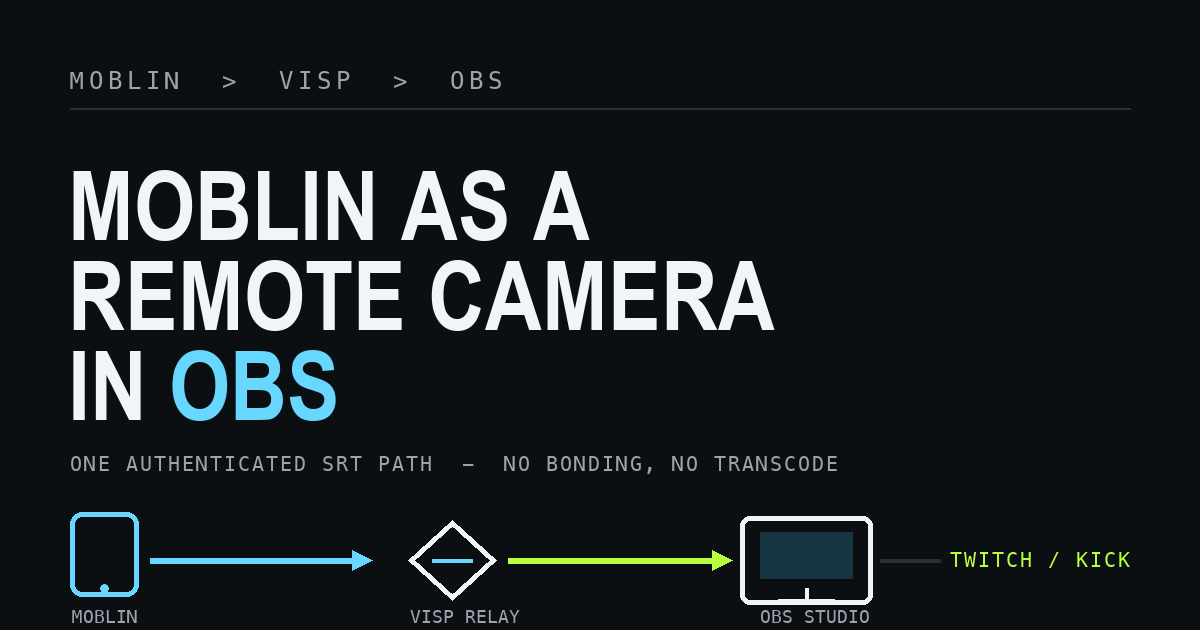
To use Moblin as a remote camera in OBS, create a video source in VISP, paste its SRT publishing URL into a Moblin stream, and add the separate OBS reading URL as a Media Source. Moblin handles capture and mobile encoding on the iPhone, VISP authenticates and relays the contribution feed, and OBS keeps control of the finished Twitch or Kick broadcast.
Moblin is a free, open-source (MIT) iOS streaming app. It can publish over SRT, so it fits the same relay pattern as any other encoder: the phone connects outward to VISP, OBS connects outward to VISP, and the home network never needs an inbound SRT port. The Twitch or Kick stream key stays in OBS, not on the field phone. (If you would rather skip OBS, VISP Direct can send the same Moblin feed straight to Twitch, Kick, or YouTube from the relay. This guide covers the OBS workflow.)

Why Moblin, and how its bonding fits VISP
Moblin is worth singling out because it does more than plain SRT. Its README lists support for "RTMP, RTMPS, SRT, SRTLA, RIST or WHIP (WebRTC)," plus "Adaptive bitrate for SRT(LA)" and the ability to "use one cellular, one WiFi and multiple Ethernet connections simultaneously. Often called bonding." That last capability is SRTLA, and it is the part most likely to cause a wrong assumption about this workflow.
SRTLA is a separate protocol layered on SRT. Per the
BELABOX SRTLA project, it needs both a
sender and a matching receiver: srtla_send spreads one SRT stream across
several links, and srtla_rec reassembles them "back into a coherent SRT
stream" before handing it to a normal SRT application. In other words, bonding
only works if the far end is an SRTLA receiver.
The VISP relay runs one. Each VISP device has an srtla:// URL next to its
plain srt:// URL, and srtla_rec hands the reassembled stream to the relay
with the same credentials. So you have two choices: point Moblin at the plain
SRT URL for a single-link contribution, or at the SRTLA URL to bond cellular
and Wi-Fi. Both links still share one phone and often the same coverage, so
for heavier bonding needs compare dedicated encoders in
VISP vs BELABOX vs LiveU Solo. The
steps below start with plain SRT and note where SRTLA differs.
What you need
- Moblin installed on the field iPhone (App Store, free)
- OBS Studio on the production computer
- A VISP account signed in with Twitch, Kick, or Google, with the dashboard Mode menu set to Phone to your OBS (Direct is the default; leaving it on while OBS also streams to the same platform puts two publishers on one channel)
- Enough sustained upload capacity for Moblin and download capacity for OBS
- Headphones for checking audio without creating a return-path echo
- A local OBS fallback scene for a field interruption
Rehearse with the same phone, carrier, route, and time of day you expect to use on the day. A fast Wi-Fi test at home does not validate a moving cellular production, and Moblin's on-screen bitrate and connection statistics are only meaningful on the real route.
1. Create a Moblin video source in VISP
Sign in to VISP, open the dashboard Devices tab, choose Add device under Video sources, and give it a practical name such as "roaming Moblin" or "handheld iPhone." One VISP device represents one publishing path.
Choose Copy beside Add this to video source. The value begins with
srt:// and includes the path's publishing credential. Treat the whole URL as a
password: do not paste it into screenshots, chat, stream overlays, or a public
troubleshooting post.
VISP shows SRT by default. Keep it unless the sending network blocks UDP or you want to bond. Turn on Show RTMP and SRTLA fallback URLs on the same tab to reveal the device's RTMP and SRTLA URLs. Switching to RTMP does not add bandwidth to a connection that simply lacks enough upload capacity. For the exact dashboard flow, see the VISP documentation for adding a video source.
2. Add the SRT stream in Moblin
In Moblin, open Settings → Streams → Create stream, then set its URL to
the complete VISP publishing URL. Because the URL uses the srt:// scheme,
Moblin sends over plain SRT rather than SRTLA — which is exactly what a VISP
video source expects. Select that stream as the active one before returning to
the camera view.
Paste the VISP URL as a single value. Do not try to split it into separate
server, stream ID, or password fields, and do not edit the scheme or port by
hand. The generated URL already carries the SRT stream ID and authentication
data in the format the relay expects. To bond, paste the device's separate
SRTLA URL instead; it points at the relay's SRTLA port (UDP 5000), so changing
srt:// to srtla:// on the plain URL is not enough.
3. Choose settings the mobile connection can sustain
Use H.264 video and AAC audio for the predictable VISP-to-OBS path. Set a two-second keyframe interval and pick a resolution and frame rate the phone can hold steady. Lock the camera orientation before you compose the source in OBS; switching from landscape to portrait later can break an existing crop or scene layout.
Do not choose bitrate from a single speed-test peak. Measure the real route and leave margin below the repeatable upload result. A stable 720p30 picture is more useful than a nominal 1080p feed that constantly queues, freezes, or reconnects.
| Network behavior | Better first adjustment |
|---|---|
| Bitrate repeatedly approaches available upload | Lower target bitrate |
| Short bursts of loss or jitter | Increase SRT latency |
| Capacity changes while moving | Enable Moblin adaptive bitrate |
| Long dead zone or total carrier outage | Use OBS fallback or add bonding (SRTLA) |
Moblin's README explicitly lists "Adaptive bitrate for SRT(LA)," which lets the encoder lower and later restore bitrate as mobile capacity changes. Test it at the lowest picture quality you would accept before relying on it live. Adaptive bitrate can trade detail for continuity; it cannot send video when the active connection has no usable route.
On the relay-to-OBS path VISP does not transcode the incoming feed. The codec, resolution, frame rate, keyframe interval, and bitrate Moblin sends are what the relay passes toward OBS. Fix an incompatible or oversized contribution at the encoder rather than expecting the relay to convert it.
4. Tune SRT latency from the field network
SRT can retransmit missing UDP packets while they are still useful, and its latency window is what gives those retransmissions time to arrive. Too small a window shows visible loss; an unnecessarily large one adds delay to the field-to-studio path. The SRT project documents this automatic-repeat behavior, and the SRT Alliance overview explains why latency is tied to round-trip time.
Run VISP's latency probe (dashboard Advanced tab) on the connection Moblin will actually use and select the correct network profile. VISP turns the median of seven round-trip samples into these starting recommendations:
| Profile | Recommendation | Minimum |
|---|---|---|
| Wired | 3× measured RTT | 120 ms |
| Wi-Fi | 4× measured RTT | 300 ms |
| Cellular | 6× measured RTT | 600 ms |
Enter the recommended millisecond value in Moblin's SRT latency setting for that stream. Cellular gets more headroom because its jitter is often bursty. Do not shrink the value just to advertise a smaller delay; watch motion and recovery on the real route first. The OBS SRT guide describes latency the same way, in microseconds on the URL; VISP applies more conservative profile floors tuned for mobile contribution.
5. Bring the Moblin feed into OBS
Moblin uses the publishing URL. OBS must use the separate reading URL. They are intentionally different credentials.
The quickest OBS setup is to pair the VISP plugin, select the Moblin device, and add it to the current scene. The plugin creates the authenticated Media Source without exposing a public control port, exactly as described in VISP OBS remote control. Alternatively, download the generated scene collection and choose Scene Collection → Import; it includes a Fallback scene and one reconnecting Media Source scene per active VISP device.
For a manual source:
- Reveal or copy the device's OBS read URL in VISP (the dashboard OBS tab in Phone to your OBS mode).
- In OBS, add a Media Source.
- Clear Local File.
- Paste the OBS reading URL into Input.
- Set Input Format to
mpegtsif it is not already supplied. - Confirm the source reconnects after Moblin stops and starts again.
Rotating the account-wide OBS read credential invalidates every existing OBS source for that account, so do it only when you intend to replace them. Rotating one Moblin device's publish credential affects only that device. This is the same source workflow used for the phone-as-an-OBS-camera guide and the Larix Broadcaster setup; Moblin simply replaces the encoder on the phone.
6. Test recovery before the real broadcast
Start Moblin before you send OBS to Twitch or Kick. The matching VISP device should change to Live, and the OBS source should begin moving once the SRT connection and a decodable keyframe arrive.
Run this short failure drill with the destination still offline:
- Confirm motion and audio in OBS for several minutes.
- Disable the phone's active network.
- Verify OBS stays connected and shows the local fallback scene.
- Re-enable the phone network and watch Moblin reconnect.
- Confirm the same OBS Media Source resumes without a new URL.
- Wait for stable playback before cutting back to the field camera.
For a production that should keep entertaining viewers while the camera is offline, follow the mobile-network resilience guide and configure a Media-state condition in Advanced Scene Switcher so a brief decoder change does not flap between scenes.
What this setup does not do
VISP relays the authenticated feed to OBS without transcoding it. SRT retransmission can recover some packet loss, but plain SRT cannot combine two links or keep sending through a total outage. If one carrier must fail without interrupting the field picture, use Moblin's SRTLA URL so both links carry the stream, or a dedicated bonded encoder. Even bonded, two links in the same dead zone still drop together.
Only one publisher can own a VISP device path at a time. A second phone cannot sit pre-connected on the same URL as a seamless standby. Give every phone or encoder its own VISP device and OBS source; the multi-phone IRL guide shows how those independent sources compose in OBS.
Troubleshooting
Moblin starts, but VISP never shows Live
Check that the correct stream is selected and the full current publishing URL
was pasted unchanged: the srt:// URL, or the separate SRTLA URL if you bond. Confirm no other
encoder is already using that device path. If the credential was rotated or
revoked, replace the old Moblin URL.
VISP is Live, but OBS is blank
Make sure OBS has the reading URL, not the Moblin publishing URL. Confirm the Media Source has Local File disabled and wait for a keyframe. If the OBS read credential was rotated, download a fresh scene collection or update the source URL.
The picture freezes while moving
Lower the target bitrate, enable and test Moblin's adaptive bitrate, and rerun the VISP latency probe on the field connection. More latency helps recover bursts of loss, but it cannot compensate for sustained upload below the encoded bitrate.
Video works, but OBS has no audio
Confirm Moblin has microphone permission and is sending an AAC track, then check that the OBS Media Source is not muted and its monitoring does not create feedback on the phone.
SRT is blocked on the venue network
Turn on Show RTMP and SRTLA fallback URLs on the Devices tab, copy that device's RTMP publishing URL, and create an RTMP stream in Moblin. Keep OBS on its generated reading path. RTMP is a compatibility fallback over TCP, not a cure for insufficient bandwidth.
Pre-stream checklist
- The dashboard Mode is Phone to your OBS.
- Moblin's active stream uses the current VISP
srt://(or SRTLA) publishing URL. - H.264, AAC, orientation, keyframe interval, and bitrate are tested.
- SRT latency comes from a probe on the real field network.
- Adaptive bitrate is enabled and tested when mobile capacity varies.
- OBS uses the separate reading URL and receives both picture and audio.
- The destination stream key remains only in OBS.
- A forced outage switches to fallback and the same source recovers.
- Every additional camera has its own VISP device and credentials.
Frequently asked questions
Does Moblin send directly to Twitch or Kick in this workflow?
No. Moblin sends a contribution feed to VISP, OBS receives it, and OBS sends the finished production to Twitch or Kick. That keeps scenes, alerts, recording, and the destination stream key at the studio. If you do not need OBS, VISP Direct can send the Moblin feed to the platforms from the relay instead.
Can I use Moblin's SRTLA bonding through VISP?
Yes. The VISP relay runs an SRTLA receiver. Turn on Show RTMP and SRTLA
fallback URLs on the Devices tab and paste the device's SRTLA URL into
Moblin instead of the srt:// URL.
Should I use SRT or RTMP from Moblin?
Use SRT by default for recovery on an unpredictable network. Use RTMP when the sending network cannot pass UDP. Neither protocol creates bandwidth or bonds connections; that is SRTLA's job.
Is Moblin required for VISP?
No. Moblin is a strong free option on iPhone, especially for creators who value an open-source encoder. VISP's own native and browser publishers, and encoders like Larix Broadcaster, cover the same relay path.
Sources and next steps
- Moblin open-source project (README and capabilities)
- BELABOX SRTLA bonding protocol
- VISP: add a video source
- VISP: OBS remote control and publishing devices
- VISP: encoders, SRT latency, and fallback
- OBS SRT protocol streaming guide
- Haivision SRT open-source project
If you already produce in OBS and want a free open-source phone encoder to become a managed field camera, try VISP: create one device, paste its SRT URL into Moblin, and run the failure drill before your next live show.
Bring the field into your OBS studio
Try VISP free during beta. You never have to paste a stream key anywhere.
Try VISP free