Best Bitrate for IRL Streaming: 720p or 1080p From Phone to OBS?
Choose the best mobile IRL streaming bitrate for 720p or 1080p, budget phone and home bandwidth separately, and test the real route before live.
By VISP Team ·
For most phone-to-OBS IRL streams, start with 720p30 at about 2,500 kbps on cellular. Move to 1080p30 at about 4,500 kbps only after the real route can hold that rate with margin. A stable 720p feed gives OBS more usable pictures than a sharper feed that repeatedly stalls, reconnects, or arrives too late for SRT to repair.
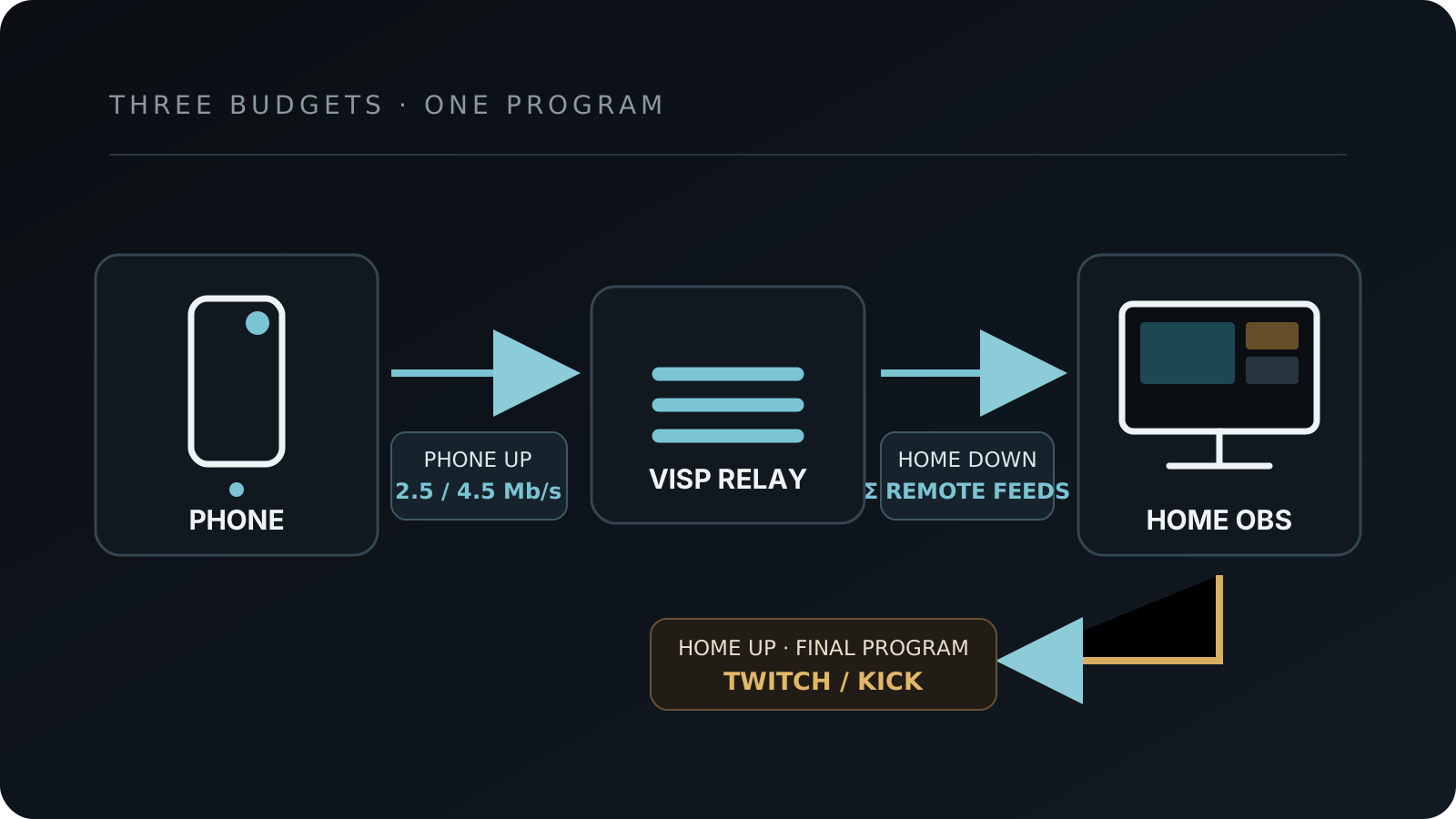
Those numbers describe the contribution feed from the phone, not the final bitrate Twitch, Kick, or YouTube receives. The two internet legs have different jobs, different bottlenecks, and separate bitrate settings. Keeping them separate is the most important idea in this guide.
The short answer: use the lowest format that preserves the content
Use this as a practical starting point for one remote phone:
| Phone network and content | Start with | Contribution video bitrate |
|---|---|---|
| Moving IRL stream on cellular | 720p30 | 2,500 kbps |
| Stable Wi-Fi, interviews, or detail that matters | 720p30 | 3,500 kbps |
| Tested strong cellular with useful upload margin | 1080p30 | 4,500 kbps |
| Tested stable Wi-Fi or wired encoder | 1080p30 | 6,000 kbps |
| Fast motion on a controlled connection | 1080p60 | 8,000 kbps |
These are starting points, not promises. They match VISP's current connection guidance model: cellular gets a lower target, and 1080p60 is not recommended there. The open-source guidance implementation uses 2,500 kbps for cellular 720p30 and 4,500 kbps for cellular 1080p30. The VISP phone app uses format ceilings of 4,500 kbps for 720p (4,000 kbps when Direct is on), 6,000 kbps for 1080p30, and 8,000 kbps for 1080p60, then adjusts to link conditions; its bitrate logic is public.
The platform guidance points in the same direction. Twitch's official broadcasting guidelines list 3,000 kbps for 720p30 and 4,500 kbps for 1080p30. Kick's current mobile quality guide places 720p30 in a 2,500–4,500 kbps range, 1080p30 in a 4,500–6,000 kbps range, and specifically recommends 720p for IRL streams with frequent movement because it is more stable than 1080p.
Platform recommendations describe streams sent to those platforms, while the VISP numbers describe a source sent to the relay. They are not interchangeable rules, but they are useful independent checks that the starting points are reasonable for H.264 live video.
Contribution bitrate and destination bitrate are different
In a VISP workflow, the phone never sends straight to Twitch or Kick. It encodes its camera and uploads that contribution feed to a VISP relay. What happens next depends on the output you chose:
- Direct (the default): the relay decodes the feed and runs a separate distribution encode for each selected Twitch, Kick, or YouTube destination.
- Relay to OBS (optional): the relay passes the same feed untouched to the home OBS computer, OBS combines it with scenes, alerts, local cameras, and audio, then encodes one finished program and uploads it to the platform.
Either way, the phone's upload budget controls whether the camera picture reaches the relay. With OBS, the home connection also needs enough download for every remote feed and enough upload for the single final program. A 4,500 kbps phone feed does not force the destination to 4,500 kbps, and a 6,000 kbps final encode does not give a 2,500 kbps phone source more detail.
For two phones publishing at 2,500 kbps each into OBS, the home studio should expect roughly 5,000 kbps of incoming video payload before audio, protocol overhead, and SRT retransmissions. OBS still sends only one final program to the platform. See the multi-phone IRL guide for the separate-source and credential setup.
This is also why a speed test at the home studio cannot validate the field phone. If OBS is in the chain, test both locations. The path that fails is not necessarily the path with the smaller headline speed.
How much upload speed should the phone have?
Do not set the video bitrate equal to the best upload result you saw once. Live video also carries audio and protocol overhead, and SRT may retransmit lost packets. More importantly, cellular capacity changes as the phone moves, hands off between cells, enters buildings, competes with other devices, and heats up.
Kick's current mobile guide recommends keeping the bitrate below half of available upload speed. That is a useful conservative test gate for a mobile contribution feed too:
| Contribution target | Conservative tested upload target |
|---|---|
| 2,500 kbps | At least 5 Mbps |
| 3,500 kbps | At least 7 Mbps |
| 4,500 kbps | At least 9 Mbps |
| 6,000 kbps | At least 12 Mbps |
| 8,000 kbps | At least 16 Mbps |
Treat "tested upload" as a repeatable result on the actual route and at the actual time of day—not the phone's 5G icon, the carrier's advertised peak, or one test beside a tower. If the route occasionally falls below the target, adaptive bitrate can trade detail for continuity. If it falls to zero, no bitrate setting can carry the picture.
The OBS connection troubleshooting guide makes the same underlying diagnosis for the final output leg: dropped network frames mean the connection is unstable or cannot keep up with the configured bitrate. Lowering bitrate is the first useful isolation step, even when a speed test looks fast.
720p30 is usually the better mobile default
Resolution is only valuable when the encoder has enough bits to describe every frame and the network delivers those bits on time. IRL footage is difficult: walking creates motion across most of the image, leaves and crowds create fine detail, and low light adds sensor noise that also consumes bitrate.
At the same network quality, 720p30 asks the encoder to describe fewer pixels than 1080p30. It leaves more room for motion, audio, retransmissions, and sudden capacity changes. It also reduces encoding work and usually helps a phone stay cooler over a long session.
Choose 1080p30 when viewers genuinely benefit from the detail: a static remote interview, readable physical objects, a wide venue shot, or a controlled connection that has already passed a long test. Do not choose it only because the camera menu offers it. OBS can scale a 720p source inside a 1080p canvas; that does not invent detail, but it preserves a production layout while the field feed uses the safer format.
Choose 60 fps only when motion clarity is central and the complete chain has been tested. Doubling frame rate gives the encoder half as much time per frame and needs more bitrate, processing, radio time, and battery. Kick's mobile guide says 30 fps is suitable for most IRL and conversational streams, while 60 fps is most useful for genuinely fast motion.
Data use: what the bitrate costs per hour
Bitrate also predicts mobile data use. For video payload alone:
| Video bitrate | Approximate data per hour |
|---|---|
| 2,500 kbps | 1.1 GB |
| 3,500 kbps | 1.6 GB |
| 4,500 kbps | 2.0 GB |
| 6,000 kbps | 2.7 GB |
| 8,000 kbps | 3.6 GB |
The calculation is kbps × 3,600 ÷ 8, converted from kilobits to decimal
gigabytes. Real usage is higher because the stream also contains audio and
transport overhead. On a lossy SRT connection, retransmitted packets add more.
Haivision's SRT socket
documentation
explains that the receiver's latency buffer gives missing packets time to be
retransmitted; that recovery consumes time and bandwidth, not free capacity.
For planning, use the table as a floor and check the phone's measured data use after a rehearsal. Carrier accounting and app telemetry may round differently.
Configure the phone source, then the final output separately
With the VISP phone app, choose the camera, resolution, and frame rate. The app sets the format's bitrate ceiling and adapts its target from live link conditions. While live, the phone and dashboard can show the measured bitrate, round-trip time, and packet loss; the dashboard also flags a congested path. Use those signals to decide whether the higher format is sustainable.
With Larix, Moblin, OBS as a sender, or another manual encoder:
- use H.264 video and AAC audio;
- use constant bitrate and a two-second keyframe interval;
- start with the table above;
- enable adaptive bitrate on cellular when the app supports it;
- publish over SRT by default, with RTMP as a fallback when UDP is blocked.
The exact URL steps are in Add a video source, while Encoders and fallback covers the latency probe and automatic OBS fallback scenes. The SRT versus RTMP guide explains why the protocol choice does not reduce the media bitrate itself.
With Direct, the relay makes the final encode, so there is no platform bitrate to set on the phone. If OBS sends the final program instead, configure that Twitch or Kick output according to the platform and the home uplink. Twitch's current table tops its listed examples at 6,000 kbps. Kick's OBS setup guide documents H.264, CBR, a two-second keyframe interval, and up to 8,000 kbps. Do not copy a platform maximum into the phone encoder by reflex; the field link still decides what it can sustain.
The relay cannot fix a weak upload
On the relay-to-OBS path the relay does not transcode: the codec, resolution, frame rate, and bitrate produced by the phone are the feed OBS receives. Direct re-encodes for each platform, but only after the phone's feed has arrived, so it cannot restore detail lost to a weak upload.
Adaptive bitrate belongs in the publishing app. Extra capacity comes from bonding at the sender: VISP Native's optional network bonding, whose default SRTLA (aggregating) mode combines Wi-Fi and cellular through the relay, or the other options in the mobile network resilience guide. SRT can retransmit packets inside its latency window, but retransmission cannot create missing bandwidth.
That boundary is useful when troubleshooting: lower the source format at the phone, not at the relay. If the route must survive one carrier failing, turn on bonding with a second independent link rather than raising SRT latency or bitrate.
A 15-minute route test
Run this before choosing 1080p for a real event:
- Start at 720p30 and the cellular or Wi-Fi bitrate from the table.
- Run the VISP relay latency probe on the same network the encoder will use.
- Publish for at least 15 minutes while walking the actual route.
- Watch measured bitrate, RTT, packet loss, reconnects, phone temperature, battery, and the advancing picture on the platform (or in OBS).
- Force one short interruption and confirm your fallback works while the phone reconnects: the optional BRB card with Direct, or a local fallback scene in OBS.
- Raise only one variable—resolution, frame rate, or bitrate—and repeat.
Do not raise all three together. If 1080p30 fails, return to the last stable 720p30 result rather than hiding the failure with a very large SRT latency buffer. The phone-as-remote-camera walkthrough covers the complete setup, audio check, and go-live sequence.
Frequently asked questions
Is 2,500 kbps enough for a 720p IRL stream?
Yes, it is a sensible cellular starting point for 720p30. Detailed, fast-moving scenes may look cleaner at 3,000–3,500 kbps if the route can sustain it. Stable delivery matters more than reaching the top of the range.
Should the phone and the platform output use the same bitrate?
No. The phone bitrate describes one remote source. The Direct or OBS output bitrate describes the finished program sent to Twitch, Kick, or YouTube. Configure and test each internet leg independently.
Will OBS improve a low-bitrate phone feed?
OBS can scale, compose, and re-encode it, but it cannot restore detail already lost in the phone's encode. A clean 720p source can still look intentional inside a 1080p production.
Is 1080p60 worth it for IRL streaming?
Usually not on ordinary cellular. Use it for fast motion only after a long route test shows at least the required sustained upload margin, acceptable heat and battery behavior, and stable delivery into OBS.
Does SRT let me use a higher bitrate on the same connection?
No. SRT can recover some lost packets within a latency window. Those retransmissions use additional bandwidth. It improves behavior under loss; it does not increase link capacity.
Can Wi-Fi and cellular add their speeds together?
Yes, with real aggregation. VISP Native's optional network bonding defaults to SRTLA (aggregating), which spreads one stream over both links through the relay's SRTLA receiver. Moblin, BELABOX, or Speedify can do the same job. The app's Broadcast mode is different: it sends the same packets over both links for failover and does not add their speeds. Size the bitrate so the stream still survives when one link weakens.
Sources and next steps
- VISP encoders, latency probe, and fallback
- VISP video source setup
- VISP bitrate and adaptive-link logic
- VISP connection guidance model
- Twitch broadcasting guidelines
- Kick mobile stream quality and bitrate guide
- Kick OBS streaming settings
- OBS stream connection troubleshooting
- Haivision SRT socket options
If you want to test the safer phone-to-studio workflow, try VISP: start with one 720p30 source, measure the relay path on the real mobile network, confirm the picture on the platform or in OBS, and raise quality only after the route proves it has room.
Bring the field into your OBS studio
Try VISP free during beta. You never have to paste a stream key anywhere.
Try VISP free